Short answer: Thinkific is a strong course platform, and in 2026 it costs more than it used to. The cheapest plan, Basic, is $40/month annual, but certificates, graded assignments, live cohorts, and memberships all start a tier up on Start ($82/month annual). Every named plan still caps you at 10,000 current students, and keeping your own Stripe account costs an extra 5%, 2%, or 1% depending on the plan. Weigh the lack of a free tier, the learning curve, and the need to handle student support yourself. Check the billing and cancellation section before you decide.
What Is Thinkific?
Thinkific is a feature-rich course platform founded in 2012 in Vancouver, Canada. It's now a publicly traded company (TSX: THNC) used by tens of thousands of course creators. Thinkific is popular with tech-savvy creators, organizations needing SCORM compliance, and anyone who wants granular control over how their course site looks and works.
How Much Does Thinkific Cost? Pricing Plans (2026)
Thinkific offers three standard plans plus a custom Plus tier. Pricing verified on Thinkific's site in September 2026. Thinkific Payments, its own processor, adds 0.5% on US, Canadian, UK and EU sales for sales-tax handling. If you'd rather keep your own Stripe account, Thinkific charges a third-party gateway fee — 5% on Basic, 2% on Start, 1% on Grow — in the US, Canada, the UK, and the EU, and it only stops after your first $1M in sales each year.
| Plan | Monthly | Annual | Key Features |
|---|---|---|---|
| Basic | $54/mo | $40/mo | Unlimited courses, 1 community, up to 5 digital products, custom domain — no certificates, quizzes, or cohorts |
| Start | $109/mo | $82/mo | Certificates, assignments, live cohorts, payment plans, memberships, HTML/CSS |
| Grow | $219/mo | $164/mo | 3 communities, remove branding, enhanced analytics, API, phone support |
| Plus | Custom pricing — SCORM, SSO, learning paths, AI assistant, dedicated support | ||
Two limits apply to all three named plans: 10,000 current students, and the third-party gateway fee if you process through your own Stripe rather than Thinkific Payments. Annual totals work out to $475 on Basic, $978 on Start, and $1,968 on Grow.
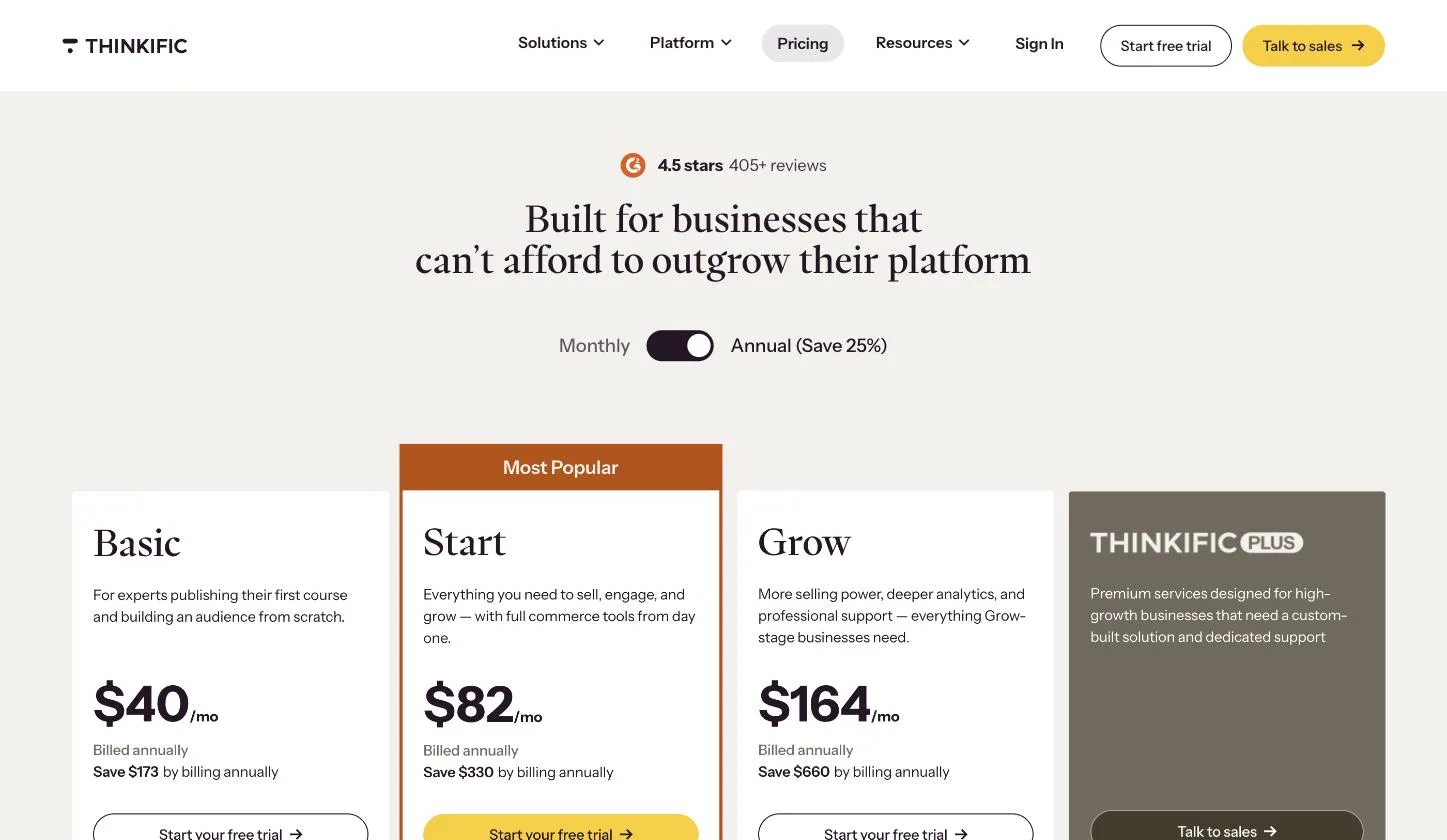
How we verified
We captured this directly from thinkific.com/pricing in August 2026 — not from an affiliate roundup. Captured on annual billing. The monthly rates behind these are $54, $109, and $219. Thinkific's own 'save' figures give the annual totals: $475, $978, and $1,968. Pricing pages change, so we date every screenshot.
No permanent free plan: Thinkific retired its free plan and offers a 30-day free trial of the full platform instead. For a complete breakdown with annual savings, cost scenarios, and what each plan includes, see our Thinkific pricing deep dive.
What Thinkific Costs at $2k, $5k, and $10k/Month
When you sell courses using your own Stripe account, Thinkific adds a third-party gateway fee (5% on Basic, 2% on Start, 1% on Grow). The table below compares total monthly platform costs with Ruzuku Core ($83.08/mo on annual billing, $997/year, or $99/mo monthly, with 0% platform fees).
One condition first. These numbers assume you process payments through your own Stripe account. If you use Thinkific Payments, the gateway fee doesn’t apply. Thinkific Payments instead adds 0.5% on US, Canadian, UK and EU sales for its sales-tax handling, on top of Start at $82/mo on annual billing, against Ruzuku Core at $83.08/mo. At $2,000 a month in sales that 0.5% is $120 a year, and the two cost about the same, so choose on features, support, and ease of use. At $10,000 a month it’s $600 a year, and Core costs less.
| Monthly Sales | Thinkific Basic (5% fee) | Thinkific Start (2% fee) | Ruzuku Core (0% fee) | Yearly difference if you use your own Stripe |
|---|---|---|---|---|
| $2,000/mo | $140/mo ($40 + $100 fee) | $122/mo ($82 + $40 fee) | $83.08/mo ($0 fee) | $461 – $678 / year |
| $5,000/mo | $290/mo ($40 + $250 fee) | $182/mo ($82 + $100 fee) | $83.08/mo ($0 fee) | $1,181 – $2,478 / year |
| $10,000/mo | $540/mo ($40 + $500 fee) | $282/mo ($82 + $200 fee) | $83.08/mo ($0 fee) | $2,381 – $5,478 / year |
*Yearly differences use Thinkific’s own annual totals ($475 Basic, $978 Start) against Core at $997. Costs reflect annual billing and exclude standard Stripe merchant processing (2.9% + 30¢), which applies identically on both platforms. Thinkific Basic excludes certificates, quizzes, and live cohorts. Ruzuku Core includes quizzes and live sessions; certificates are on Ruzuku Pro.
What Changed in Thinkific's Pricing in 2026?
Thinkific reshuffled its plans in 2026. Three changes affect what you'll pay and get:
- A cheaper entry tier, with less in it. Basic sits below Start at $40/month annual ($54 monthly). It gets you unlimited courses, one community, and a custom domain — but no certificates, no graded assignments, no live cohorts, and no memberships.
- Those features start on Start. Certificates, assignments, payment plans, memberships, and live cohorts all begin at $82/month annual ($109 monthly), which is the price most creators will actually pay.
- The Expand tier is gone. Above Grow ($164/month annual, $219 monthly), the only option on the public pricing page is custom-priced Plus.
What didn't change is the part people get caught by. Every named plan still counts 10,000 current students as its ceiling, and Thinkific still takes a third-party gateway fee — 5% on Basic, 2% on Start, 1% on Grow — when you run payments through your own Stripe instead of Thinkific Payments. That fee applies in the US, Canada, the UK, and the EU, and it's waived only after your first $1M in sales each year.
The entry point is the other trade-off. Thinkific retired its permanent free plan, so once the 30-day trial ends there's no free way to keep teaching — you're on a paid plan (Basic is $40/month annual, $54 monthly). If you'd rather not pay before you've validated your course, that's the gap — Thinkific's trial runs 30 days and then stops, while Ruzuku keeps a free plan with no time limit where you can teach up to 5 students at a time.
Does Thinkific Work With Mailchimp, ConvertKit, and Other Tools?
Yes. Thinkific integrates with a wide range of marketing and business tools, both natively and through Zapier. Common integrations include:
- Email marketing — Mailchimp, ConvertKit, ActiveCampaign, AWeber (via Zapier or native integrations)
- Payment processing — Stripe and PayPal (built-in on all plans)
- Automation — Zapier connects Thinkific to hundreds of tools for enrollment triggers, student data sync, and more
- Analytics — Google Analytics, Facebook Pixel
- Community — Built-in community features on paid plans
If you rely heavily on a specific email provider like Mailchimp or ConvertKit, Thinkific will connect — though the setup may require Zapier rather than a direct integration. This adds a step compared to platforms with native email integrations (like Kajabi, which has email built in).
Is Thinkific Easy to Use?
It depends on what you're comparing to. Thinkific's course builder is well-designed, and creating a basic course is straightforward. But the platform offers extensive customization — site themes, page layouts, code-level editing, multiple content types — and learning to use it all takes time.
Creators who want deep control over their course site's look and behavior will appreciate the flexibility. But creators who just want to get a course published and start teaching may find the number of options overwhelming. A yoga teacher who wrote to us in November 2024, before Thinkific's 2026 plan changes, had tried both Thinkific and Teachable on free trials:
"I've done some free trials with Teachable and Thinkific and am not a fan of either. At least in the past, Ruzuku's course creation interface was much more user friendly."
If getting a course in front of students quickly matters most to you, consider a simpler platform like Ruzuku.
Does Thinkific Support SCORM?
Yes — Thinkific supports SCORM-compliant content on its Plus (enterprise) plan. This makes it one of the few hosted course platforms suitable for corporate training, continuing education, and compliance programs that require SCORM tracking.
If you need SCORM compliance for internal training or staff development, Thinkific's Plus plan is worth evaluating. Most other course platforms (including Ruzuku, Teachable, and Kajabi) don't support SCORM at all.
What Is Thinkific Best For? (And Where It Falls Short)
Thinkific's strengths:
- Extensive customization — More control over your course site's design, including HTML/CSS access on Start plan and above.
- Strong community features — Built-in community tools that have improved significantly in recent years.
- No platform cut on Thinkific Payments — run sales through Thinkific's own processor and it takes nothing beyond standard card rates.
- SCORM support — Enterprise-grade compliance for corporate and continuing education use cases.
- Affiliate management — Built-in affiliate tracking with auto-calculated commissions.
Where it falls short:
- Steeper learning curve — More features means more configuration time before you can start teaching.
- No student tech support — You're responsible for helping students with login issues, access problems, and technical difficulties.
- No permanent free plan — Just a 30-day trial, then you're on a paid plan (Basic is $40/month annual, and the features most courses need start at $82). No free way to keep teaching once the trial ends.
- A 10,000-student ceiling — Every named plan, Grow included, caps current students at 10,000. Past that you're negotiating a custom Plus contract.
- A fee for keeping your own Stripe — 5% on Basic, 2% on Start, 1% on Grow, on top of Stripe's own rates, unless you move to Thinkific Payments.
- Branded app is Plus-only — A native mobile app comes with select Plus contracts. Thinkific doesn't publish a price for it.
- Premium features gated to Plus — SCORM, SSO, learning paths, and the AI assistant all require the custom-priced Plus plan.
What Educators Tell Us
We've had nearly 290 support conversations where educators mention Thinkific. The quotes below come from those emails, shared by first name and last initial where the sender gave one. One caution before you read them: these are people who wrote to a Thinkific competitor, and we chose which quotes to show. Read them as individual experiences, not a survey.
Where Thinkific does better: Affiliate programs come up more than anything else. Thinkific tracks affiliate sales and calculates commissions for you. Ruzuku doesn't have a built-in affiliate program, and one of our own Pro customers told us exactly what that costs her:
"I have to manually calculate her commission, on thinkific that is done automatically."
Educators also mention Thinkific's integrations with tools like ConvertKit, SCORM support for corporate training, and multi-instructor options. If you run a big affiliate program, that alone may decide it for you.
Unease about where Thinkific is heading: A few Thinkific users have told us they're uneasy about the platform's direction. A Reiki teacher wrote to us in 2024:
"I'm interested in switching from Thinkific to you since things are changing (and not in a good way 😉) over there."
The teacher's view from inside someone else's course: The same art teacher taught a month-long module inside another creator's year-long Thinkific course in 2025. Part of her problem was how that school was set up: she was enrolled as a student rather than given a teaching role. Still, it shows what the teaching side can feel like:
"I absolutely hated the thinkific experience.. so many ways Ruzuku is better! Although I taught a month long module on a year long course I was only enrolled as student. I couldn't adjust my preferences, didn't get any notifications of student activity, so had to log in three or four times a day to check they were OK."
Why some chose Ruzuku instead: The reason we hear most is ease of use. One course creator who had used both platforms, as a teacher and as a student, wrote:
"I prefer Ruzuku to Teachable and Thinkific both of which I tried as teacher and student. Ruzuku is the prettiest and the easiest to navigate. And your customer service is great."
Not everyone who leaves Thinkific picks us, either. In 2026 a curriculum publisher with a large student base spent two weeks evaluating Ruzuku and called it "arguably a better fit for us than Thinkific," then chose a different platform because it connects directly to Shopify. If your store runs on Shopify, weigh that.
Switching is work, whichever way you go: Educators who've already moved once are wary of doing it again. A diversity-training consultant comparing the two platforms in 2023 put it plainly:
"The cost is one issue, and although migrating content is easy enough, platform-hopping is a HUGE time suck."
That matches what we see. Moving the course content is the predictable part. The fiddly part is the custom domain, where you repoint a DNS record from Thinkific to your new platform, and re-inviting students, whose progress doesn't carry over.
How Does Ruzuku Compare?
Where Thinkific emphasizes customization, Ruzuku emphasizes simplicity and the learning experience:
- Simple to use — fewer settings to configure before you can teach your first lesson.
- Student tech support included — Ruzuku's team handles your students' technical issues directly. Thinkific leaves that to you.
- Built-in video meetings + Zoom integration — Run live cohort-based sessions directly within courses (no Zoom account needed for the built-in option).
- A free plan with no time limit — Teach up to 5 students at a time, with no card needed. That's room to rebuild one course and test it with a few students before you decide. Thinkific offers a 30-day trial instead.
For the complete feature-by-feature comparison, see Ruzuku vs Thinkific →
Frequently Asked Questions
Is Thinkific legit?
Yes. Thinkific is a legitimate, well-established course platform founded in 2012 in Vancouver, Canada. It's publicly traded on the Toronto Stock Exchange (TSX: THNC) and used by tens of thousands of course creators worldwide.
Does Thinkific still have a free plan?
No. As of 2026, Thinkific has no free plan — it offers a 30-day free trial of the full platform instead. The cheapest paid plan is Basic at $40/month (annual) or $54 monthly, though certificates, quizzes, and live sessions start a tier up on Start ($82/month annual, $109 monthly). For creators looking for a free starting point, see our Thinkific pricing breakdown.
Does Thinkific charge transaction fees?
It depends on which processor you use. On Thinkific Payments, Thinkific takes no cut beyond standard card rates. Process through your own Stripe account and it charges a third-party gateway fee on top: 5% on Basic, 2% on Start, 1% on Grow, and none on Plus. That fee applies in the US, Canada, the UK, and the EU, and it stops only after your first $1M in sales each year. Standard processing (about 2.9% + $0.30) applies either way.
Is Thinkific good for beginners?
It depends on your definition of "beginner." Thinkific has a well-designed interface, but its extensive customization options mean there's more to learn and configure. Creators who want to launch quickly may find a simpler platform gets them teaching faster.
How much does Thinkific cost per month?
Thinkific's named plans are Basic at $54/month ($40 billed annually), Start at $109/month ($82 annually), and Grow at $219/month ($164 annually), with a custom-priced Plus tier for enterprise. There's no permanent free plan — just a 30-day trial — and every named plan caps you at 10,000 current students. Annual billing saves about 25%. For detailed cost scenarios, see our Thinkific pricing deep dive.
What is Thinkific?
Thinkific is a course platform for creating, hosting, and selling online courses. Founded in 2012 in Vancouver, Canada, it's a publicly traded company (TSX: THNC) used by tens of thousands of course creators. It offers a deep course builder, strong customization, and built-in community features. Plans start at $40/month on annual billing, with unlimited courses but a 10,000 current-student ceiling on every named plan.
Is Thinkific reliable?
Thinkific is a publicly traded company (TSX: THNC) that has operated since 2012. However, Trustpilot reviews from 2025-2026 document content loss, accounts shut down without explanation, courses deleted for inactivity, and a $1M+ revenue creator having funds held for 90 days. Thinkific also has the lowest Trustpilot rating of any major course platform at 1.9 out of 5. Maintaining your own backups is essential.
Can Thinkific delete my courses?
Yes. Multiple sources document content loss on Thinkific. A Reddit user reports losing an entire course with no recovery available. A Trustpilot reviewer reports courses deleted for "low activity" with no warning. Another reports their entire platform shut down after two weeks with no explanation. Always maintain your own backups of all course content.
Is it hard to cancel Thinkific?
Multiple Trustpilot reviews from March 2026 report continued charges after cancellation. One user describes canceling through both support and the account interface, yet still being charged — and reports the platform blocked card deletion. Thinkific's cancellation process also requires deleting all course content before the account can be closed.
What Thinkific Users Say on Review Sites
As of August 2026, Thinkific has a 1.9 out of 5 rating on Trustpilot from 864 reviews — the lowest rating of any major course platform we've reviewed, and well below the next lowest (Teachable at 3.3). "Cancellation" and "Refund" appear as Thinkific's top review tags. Here are the patterns. For the full cross-platform analysis, see our 2026 Course Platform Satisfaction Report.
Billing traps and cancellation difficulty. The most common complaint involves unexpected charges after free trials, auto-enrollment into annual (not monthly) plans, and a cancellation process that requires deleting all course content before the account can be closed. Multiple Trustpilot reviews from March 2026 describe continued charges even after in-app cancellation — and at least one user reports the platform blocking card deletion from within the account, making it impossible to stop charges without involving their bank. A separate user reports being charged €97 for a plan they never activated, with zero recorded activity on the account. For established creators with years of content, the deletion requirement creates a significant barrier to leaving.
Support gated by plan tier. Lower-tier plan holders describe extremely limited support access — often just a chatbot or async email. When users downgrade or cancel to stop charges, they simultaneously lose access to the support tier they previously had, leaving them unable to resolve billing issues created by that very downgrade. Trustpilot reviews describe specific failure modes: support chat closing mid-conversation if the page reloads, forcing half-day restart loops. During a complete site outage that locked all users out, one creator reports sending three urgent support emails over 24+ hours with no response. This creates a frustrating catch-22 that appears across many reviews.
Thinkific Payments hidden fees and PayPal removal. Users of Thinkific's native payment processor report undisclosed fees on top of standard Stripe rates and fund holds lasting months without explanation. PayPal was removed as a payment option without notice — which users describe as causing immediate drops in sales, since many students prefer PayPal. Creators relying on Thinkific Payments for recurring subscriptions find it difficult to switch processors without disrupting active subscribers.
Price increases with features moved to higher tiers. Users describe costs that doubled or tripled within two years, alongside features being moved from included to premium-only. White-label branding, bulk enrollment, CSV uploads, and PayPal acceptance all require higher-tier plans than they previously did. Thinkific replies to 76% of negative reviews, typically within two weeks — slower than some competitors — and often redirects users back to the same ticket system that already failed them.
Missing features competitors include. Users cite the absence of features they consider standard: bulk student enrollment without expensive add-ons, proper SEO tools, contact forms, and meaningful analytics on lower tiers. The affiliate management system is described as requiring manual one-at-a-time approval with no bulk option — unusable at scale for creators with active affiliate programs.
Content loss, account shutdowns, and fund holds. Beyond the course loss documented in earlier Reddit reports, Trustpilot reviews from 2025-2026 reveal additional stability concerns. A March 2026 reviewer describes having their entire platform shut down after two weeks of building, with no explanation given. A September 2025 reviewer reports courses deleted due to "low activity" — with no warning and no ability to log back in to recover files. And a creator who had processed over $1 million in revenue through Thinkific reports legitimate funds held for 90 days on a second account. Separately, users describe significant SEO damage after switching their primary domain to Thinkific — site health plummeting and traffic dropping. If you're considering Thinkific, maintaining your own backups of all course content is essential, not optional.
Backend limitations and feature-gating escalation. Users who start on Thinkific and try to grow describe hitting walls with pricing flexibility, growth tools, and backend customization. A January 2026 Trustpilot reviewer describes a pattern where even after upgrading plans, important features are continually moved to yet more expensive tiers — the platform becomes more limiting rather than less as you invest more. The 2026 plan reshuffle doesn't answer this: the new Basic tier is cheaper because certificates, quizzes, cohorts, and memberships were moved above it, and the 10,000-student ceiling still applies all the way up to Grow.
Platform performance. Multiple Trustpilot reviews describe the platform as slow and glitchy, with simple tasks taking hours due to loading failures. One creator describes the builder as frustrating at a basic level. While performance issues affect creators during course building, they can also impact the student experience — slow page loads and glitches make your course feel broken before the first lesson.
What positive reviewers praise: Easy initial course creation, the free-tier offering (now removed) that let creators test without commitment, clean student-facing experience, and good Shopify integration for product-based businesses.
One note on proportion: Trustpilot skews toward people with a problem to report, so treat the complaints above as the worst case, not the typical experience. Plenty of creators run courses on Thinkific without ever hitting any of this. The reason we flag billing and cancellation specifically is that they're the hardest to undo once your content and students live inside the platform, not because they happen to everyone.
How Ruzuku Approaches These Issues Differently
We're a competitor — keep that in mind. But here's how we handle each concern:
- Cancel without deleting your courses. Cancel anytime. Your content stays accessible. You don't need to delete your courses to close your account. If you want to leave, you can — and if you want to come back later, your content is there.
- Your own payment processor, no hidden fees. Creators keep their own Stripe account. Ruzuku never holds your funds, never adds surcharges on top of Stripe, and doesn't operate a proprietary payment processor with its own fee structure.
- Human support on every plan. You don't lose access to our support team when you change plans. We respond to you directly — and we handle your students' tech issues too, which most platforms leave to you.
- Features without enterprise pricing. Custom domains, community tools, built-in live video meetings, payment plans, and unlimited courses are included without requiring the highest-tier plan.
- Stable, transparent pricing. No forced plan migrations. No features moving to higher tiers after you've built your business on them.
- Platform reliability. Ruzuku has operated continuously since 2011 with no reported incidents of content loss. Cancel your account and your data stays intact — no content-deletion requirements.
Leaving Thinkific? Cancellation & Migration Steps
If you're an existing Thinkific creator planning to cancel or migrate to a new platform:
- Step-by-step cancellation & data export: See our detailed walkthrough on How to Cancel Thinkific: What to Know Before You Go to avoid content deletion traps and lingering renewal charges.
- Migration roadmap: Our Thinkific migration guide covers course rebuild timelines, student list transfers, and domain redirects.
- Moving to Ruzuku: There's no done-for-you migration service. You rebuild your courses yourself, and our support team answers questions along the way. See zero transaction fees and student tech support on our Switch to Ruzuku hub.
Alternatives to Thinkific
Other platforms worth exploring:
- Teachable — Marketing-focused with native mobile apps (full comparison)
- Kajabi — All-in-one with email and funnels built in (full comparison · Kajabi vs Thinkific)
- LearnDash — WordPress-based for maximum control (full comparison)
- Mighty Networks — Community-first with courses (full comparison)
For a detailed comparison of all the top alternatives, see our 7 Best Thinkific Alternatives in 2026 or explore all platform comparisons.