Video correction, October 1, 2026: The embedded video preserves older Teachable student-limit terms. The September 28 policy exempts paid-only Native/Custom gateway students, while any free or imported enrollment makes that student count, even alongside a paid enrollment. Only students added after policy conversion count; the billing-period peak above 100 costs $0.50/month each. Schools created before September 3, 2026 keep legacy terms until first renewal on or after April 30, 2027 unless converting early. Use the current article and official policy for plan decisions; the transcript preserves the original recording.
Short answer: yes, Teachable is a legitimate course platform with strengths — especially native mobile apps and affiliate marketing tools. But it has meaningful trade-offs around transaction fees, product limits, and the learning experience that are worth understanding before you commit. Here's a look at Teachable's pricing, features, and where it fits best in 2026.
What Is Teachable?
Teachable is a marketing-focused course platform founded in 2014 and acquired by Hotmart in 2020. It's designed for information marketers selling digital content products, and it's popular with creators who want affiliate tracking, sales funnels, and native iOS/Android apps for their students. If high-volume course sales are your primary goal, Teachable has built its toolset around that use case.
My verdict: Teachable suits you if you sell self-paced courses and want an iOS and Android app for your students, built-in upsells, and (from Builder up) an affiliate program. It's a harder fit if you want to try your course with students before you pay, because Teachable has no free plan, only a 7-day trial. If that's where you are, Ruzuku has a free plan with no time limit for up to 5 students, and you don't need a credit card. On every plan, our support team also answers your students’ login and access questions, so you don’t have to.
How Much Does Teachable Cost? Pricing and Transaction Fees (2026)
Teachable sells three plans off the shelf — $39 to $189/month month-to-month, or $29 to $139/month on annual billing — plus a quote-only Custom tier. The Starter plan includes a 7.5% transaction fee on every sale; the Builder plan and above charge 0% platform transaction fees.
Here's the current pricing breakdown, checked against Teachable's pricing page on September 27, 2026:
| Plan | Monthly | Annual | Transaction Fee | Products | Paying students | Certificates |
|---|---|---|---|---|---|---|
| Starter | $39/mo | $29/mo | 7.5% | 5 | Unlimited | No |
| Builder | $89/mo | $69/mo | 0% | 10 | Unlimited | No |
| Growth | $189/mo | $139/mo | 0% | 50 | Unlimited | Yes |
| Custom | Contact sales | Contact sales | 0% | Contact sales | Contact sales | Yes |
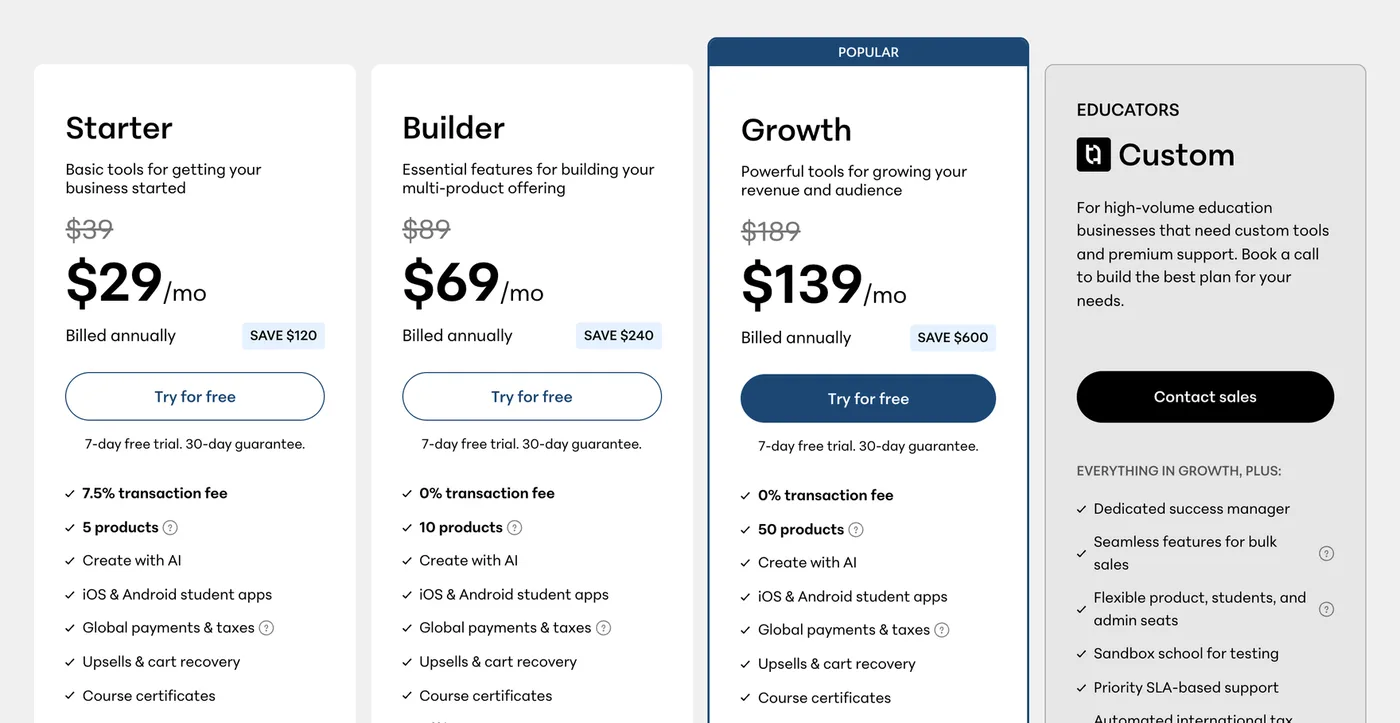
How we verified
We captured this directly from teachable.com/pricing in June 2026 — not from an affiliate roundup. Prices shown are annual billing; month-to-month runs higher (Starter is $39/mo, Builder $89). Pricing pages change, so we date every screenshot.
Current student usage terms: Under the current policy, students with only paid Native or Custom gateway enrollments are exempt from student usage fees. A free, imported, or manual enrollment makes a student count even if they also pay for another enrollment. The count starts at zero when the school moves to this policy; only students added afterward count. The billing-period peak above 100 costs $0.50/month per student. Schools created before September 3, 2026 keep legacy terms until their first renewal on or after April 30, 2027 unless they convert early.
Teachable’s plan cards list 5, 10, and 50 products. The September 28 usage policy no longer contains the earlier unlimited-published-products statement. Confirm your school’s product allowance and overage terms with Teachable.
If you've read an older comparison quoting a Teachable “Advanced” plan at $399/month, that tier is gone. It isn't on the plan cards, the billing toggle, or the feature-comparison table — the ladder is Starter, Builder, Growth, and a Custom tier you have to ask for.
What you'll actually pay: On the Starter plan, if you sell a $200 course to 10 students, Teachable takes $150 in transaction fees (7.5% × $2,000) on top of your $39 monthly fee. Standard payment processing fees (2.9% + $0.30 per transaction through Stripe) apply on all plans as well.
For a complete pricing breakdown including hidden costs and real-world scenarios, see our detailed Teachable pricing breakdown and transaction fee analysis.
When Do Teachable's Fees Become Expensive?
On the Starter plan, the breakeven point is roughly $533/month in revenue. Below that, Starter ($29/month + 7.5%) is cheaper than Builder ($69/month + 0%). Above it, the 7.5% fee costs more than the $40/month difference. Here's how the math plays out at higher revenue levels:
| Monthly Revenue | Starter ($29 + 7.5%) | Builder ($69 + 0%) | Ruzuku Core ($997/yr + 0%) |
|---|---|---|---|
| $500/mo | $67/mo | $69/mo | $83/mo |
| $2,000/mo | $179/mo | $69/mo | $83/mo |
| $5,000/mo | $404/mo | $69/mo | $83/mo |
| $20,000/mo | $1,529/mo | $139/mo (Growth) | $166/mo (Pro, $1,997/yr) |
All prices in this table are annual billing, and none include card processing. At $2,000/month in revenue, the Starter plan's 7.5% fee costs $150 — over 5x the plan price. Past about $533 a month, Builder is cheaper than Starter. Ruzuku Core beats Starter past about $721 a month, but Builder is $14 a month cheaper than Core at every revenue level. The $20,000 row compares Growth with Ruzuku Pro because both are the tier where certificates start. Builder's catch is the 10-product limit on its plan card, if that limit applies to you (see the contradiction above). Ruzuku's paid plans include unlimited courses.
Total Annual Cost: Teachable vs Ruzuku
Annual billing, the plan a seller would realistically use at each revenue level, card processing excluded
At $2,000 monthly revenue
At $5,000 monthly revenue
At $20,000 monthly revenue
Includes platform subscription + transaction fees. Standard payment processing (Stripe 2.9% + $0.30) applies to all platforms and is excluded.
Does Teachable Have a Mobile App?
Yes. Teachable offers native iOS and Android mobile apps where students can access course content on their phones. This is a strength — most competing platforms (including Ruzuku) rely on mobile-responsive web browsers rather than dedicated apps.
The mobile app lets students watch videos, read lessons, and track their progress. It's well-suited for self-paced content consumption. If your students prefer learning on their phones during commutes or downtime, this is an advantage worth considering.
Is Teachable Easy to Use? Learning Curve Review
Teachable is relatively easy to get started with for basic courses. The course builder uses a drag-and-drop interface, and you can upload videos, text, and files without technical knowledge. Most creators can publish a simple course within a few hours.
Where it gets more complex is with Teachable's marketing and sales features — building sales pages, setting up funnels, configuring order bumps, and managing automations. These are powerful tools, but they come with a learning curve that can take weeks to fully understand. If you mainly want to teach (not optimize sales funnels), you may find yourself paying for complexity you don't use.
A fine-art teacher who had given up on Teachable wrote to our support team in September 2021, while setting up her first Ruzuku course. That's one person's experience from 2021, not a test of today's builder:
"it's much easier than Teachable was...I struggled through that for far too long before bailing out."
Does Teachable Still Have a Free Plan?
No. Teachable retired its free tier, and the pricing page now starts at Starter — $39/month month-to-month, $29/month on annual billing. What you get instead is a 7-day free trial and a 30-day money-back guarantee. Several reviews still describe a free plan; they're describing a tier you can no longer sign up for.
The old free plan charged 10% + $1 on every sale and limited you to one course and 10 students, so it was never more than a sandbox — but creators who built on it and promised students lifetime access now pay at least $348/year, which is Starter's annual price. For the history of that tier and what replaced it, see our Teachable free plan review.
Does Teachable Have Attendance Tracking?
No. Teachable does not offer native attendance tracking for live sessions. If you run cohort-based courses, workshops, or corporate training programs that require attendance records, you would need to use external tools and manually reconcile the data.
This is particularly relevant for organizations using course platforms for internal staff training or compliance programs where attendance documentation is required.
What Is Teachable Best For? (And Where It Falls Short)
Teachable has strengths worth considering:
- Native mobile apps — iOS and Android apps for students, an advantage if your audience prefers learning on their phones.
- Strong affiliate marketing tools — If your growth strategy relies on affiliates promoting your courses, Teachable's built-in affiliate system is well-developed.
- Course delivery tools on every plan — Drip content, auto-graded quizzes, and short-answer assessments aren't gated behind the higher tiers.
- Large integration marketplace — Teachable connects with many third-party tools for marketing, analytics, and automation.
And some notable limitations:
- Transaction fees on the Starter plan — 7.5% on every sale adds up quickly. You need the Builder plan ($89/mo month-to-month, $69 annual) to eliminate them.
- Certificates start on Growth — Starter and Builder don't issue completion certificates. If your students need proof of completion, the entry price is Growth at $139/month annual, not $29. To be even-handed: Ruzuku gates certificates too, on our Pro plan at $1,997/year, so this is a close call rather than a win for us.
- Product limits and non-paying students — The plan cards list 5, 10, and 50 products. Current terms exempt paid-only Native/Custom gateway students; countable free/imported students added after conversion cost $0.50/month each above 100. Legacy terms differ.
- No native live session tools — If you run cohort-based or live programs, you'll need external video conferencing tools and manual workarounds.
- Video tops out at 1080p — Teachable's player maxes at 1080p, and its own help docs note 4K isn't supported. That's plenty for most lessons, but a limit if you teach visually detailed material like art or design.
How Does Ruzuku Compare?
Where Teachable focuses on marketing and sales tooling, Ruzuku focuses on the learning experience itself. A few key differences:
- Zero transaction fees — Ruzuku charges a flat monthly fee with zero per-transaction fees on every plan. No percentage taken from your sales, ever.
- Built-in video meetings + Zoom integration — Schedule and run live sessions directly within your courses (no Zoom account needed for the built-in option). No workarounds needed for cohort-based teaching.
- Up to 4K video on Pro — Teachable caps at 1080p. Ruzuku streams up to 4K on the Pro plan (1080p on Core and Free), which matters if you teach art, design, or other detail-heavy material.
- Unlimited courses, no per-student fees — Every Ruzuku plan includes unlimited courses. Core and Pro include unlimited students, however they join, so free enrollments and imports don't add a monthly fee. Under Teachable’s current terms, countable free/imported students added after conversion cost $0.50/month each above 100; legacy terms differ.
For the complete feature-by-feature comparison, see Ruzuku vs Teachable →
What Educators Tell Us
We've had over 280 support conversations with course creators who mention Teachable. Here's what patterns emerge from those real conversations.
What they like about Teachable: Native mobile apps, affiliate marketing tools, order bumps, and conversion tracking. Teachable has a strong marketing feature set for course sellers who prioritize sales optimization. Several educators specifically cite the mobile app as a reason they initially chose Teachable — their students wanted a phone-friendly experience.
Transaction fees and payment control: Fees are the single most common complaint we hear. In April 2016, when Teachable's fee was 8%, one educator wrote to our support team that it felt like being "forced to tithe to the 'Church of Teachable.'" Beyond the percentage, Teachable's move to Stripe Express shifted control of payment processing away from instructors — educators who previously managed their own Stripe accounts lost that direct relationship with their payment processor.
The round-trip pattern: We see a recurring pattern where educators leave for Teachable and come back. One educator who returned in January 2023 wrote: "So another reason that I switched back from Teachable to Ruzuku is the excellent customer service!" Another tried both Teachable and Thinkific and wasn't a fan of either, ultimately returning for simplicity and support. A third educator was referred to us by a friend who'd already made the switch — word-of-mouth from switchers is a recurring pattern.
The round trip doesn't always flatter us. One course creator left Ruzuku for Teachable years ago because our text editor at the time couldn't set color, size, or spacing. She wrote to our support team in January 2023:
"...Teachable doesn't have as good a user experience from the student point of view so I am back."
Student experience as differentiator: When educators compare the student-facing side, the feedback is consistent. This matters more than it sounds: when your students struggle with the platform, they blame your course. A course creator who had used Teachable and Thinkific, as a teacher and as a student, wrote to us in October 2023:
"I prefer Ruzuku to Teachable and Thinkific both of which I tried as teacher and student. Ruzuku is the prettiest and the easiest to navigate."
Migration reality: Moving courses between platforms requires manual rebuilding. Student subscriptions are the trickiest part — there's no automated way to transfer recurring billing. One educator's migration took multiple weeks with dedicated support. If you're considering a switch in either direction, plan for a transition period rather than an overnight cutover.
What Teachable Users Say on Review Sites
As of September 27, 2026, Teachable has a 3.3 out of 5 rating on Trustpilot from 1,105 reviews. The distribution is polarized: 38% of reviewers give five stars, while 40% give one star. That split tells you Teachable works well for some creators and poorly for others. Here's what the patterns show. For the full cross-platform analysis, see our 2026 Course Platform Satisfaction Report.
Serial price increases. The most common complaint across Trustpilot reviews and Reddit discussions involves repeated, steep price increases with little advance notice. A detailed March 2026 Trustpilot review documents a specific 6-year pricing trajectory: annual cost of approximately $348 in 2020 (with unlimited courses), forced upgrade to $1,188/year in 2022 when course limits were imposed, then $1,668/year by 2025, with the next tier needed to accommodate existing courses costing over $3,700/year. Each change came with about 30 days notice. Other Reddit users report similar patterns: annual costs jumping from $450 to $850, and legacy plan holders seeing prices double after plan eliminations. Long-term customers of 7-9+ years describe this as the tipping point. One particularly painful pattern: creators who offered lifetime student access under Teachable's former free plan now pay at least $348 a year (Starter's annual price) just to honor those promises, with no way to grandfather the original arrangement.
Support shifted from humans to AI chatbots. Users report that Teachable replaced live chat support with AI agents that provide template responses. A November 2025 Trustpilot reviewer described the experience as being unable to reach any human representative. Ticket-based support is described as slow, sometimes taking days to weeks for a response. Teachable's pricing page does list “Real time support” on Builder and Growth, but it doesn't say whether that means a person or an AI agent. Creators running active businesses express frustration at not being able to get help for time-sensitive problems. At least one Reddit user reports filing a Better Business Bureau complaint and encouraging others to do the same, citing price hikes, forced plan changes, and non-existent live chat support. Teachable has replied to 96% of negative reviews, typically within 48 hours — but responses are described as templated and rarely lead to resolution.
Withheld creator payouts. A smaller but serious cluster of reviews describes creator payouts being held for extended periods — ranging from 45 days to 90+ days — with no clear explanation or communication. This issue appears concentrated in 2024-2025 and involves amounts that represent significant business revenue.
Unexpected charges and difficult cancellation. Users report being charged after free trials ended without clear warning, being billed for annual plans when they selected monthly, and finding the cancellation process confusing. A February 2026 Trustpilot review describes being charged $500 total across repeated cancellation attempts, ultimately having to involve their bank to stop charges. Another user reports receiving no formal cancellation confirmation beyond a customer service email — no system-generated receipt, no account status change. The 7-day free trial is frequently described as too short to evaluate the platform thoroughly.
Platform bugs during live launches. Several reviews describe checkout failures during time-limited sales events — broken buttons, payment processing errors, and outages with no communication from Teachable. For creators running live launches, these failures represent direct revenue loss.
Content reliability concerns. A troubling pattern in Reddit discussions involves lost course content — specifically video files that become inaccessible with no recovery offered by the platform. At least one creator reports this issue persisting for over two years while students continued paying for the affected course. Separately, users report broken upsells and order bumps going unresolved for 3+ months despite open support tickets. For creators running active businesses, unresolved platform bugs aren't minor annoyances — they represent direct revenue loss and a broken student experience.
Course limits imposed retroactively. Reddit discussions document a pattern of retroactive feature changes. Users who originally signed up for plans offering unlimited courses received notifications that their plan would be capped — in some cases at 5 courses — with no option to add more unless they upgraded. Creators who had built entire academies with dozens of courses found themselves locked out of adding new content on the plan they were paying for. This pattern drives intense frustration because it changes the terms after creators have already invested months building on the platform.
Data lock-in. Users on Reddit report that Teachable doesn't offer CSV export of payment history — forcing creators to maintain active subscriptions just to reference transaction records for tax purposes and student support. Combined with the complexity of migrating course content and student data, leaving Teachable becomes harder the longer you stay. If you're evaluating platforms, data portability is worth asking about upfront — see our platform switching guide for what to consider.
Limited channels for user feedback. A recurring observation in community discussions is that real Teachable user feedback is hard to find online. Creators note that YouTube search results for "Teachable Review" are dominated by affiliate marketers earning commissions. Teachable also closed its community forum — a move users describe as poorly timed given it coincided with growing complaints about pricing and support quality. Without an official feedback channel, frustrated users turn to Reddit and review sites instead.
Named creators documenting their departures. Unlike anonymous reviews, several established creators have publicly documented their decision to leave Teachable. Kerstin Cable, a language education creator, blogged about migrating 30+ courses away from Teachable in 2025, describing it as a "MONSTER project" after setting a goal that January to make 2025 her last year on Teachable. She cited Teachable's focus on new customer acquisition over supporting existing users, plus rising prices for features she didn't need. Andrea Jones (OnlineDrea) dedicated a podcast episode to explaining why she left after 8 years, specifically citing the platform's limitations as a membership tool despite offering membership features. These are creators with established businesses making public, considered decisions — not impulsive reviews. When experienced users document multi-month migration projects, it signals systemic issues, not isolated frustrations.
What positive reviewers praise: Easy initial course setup and upload, clean and professional student-facing design, comprehensive content format support (video, downloads, coaching), and responsive support agents when they can be reached. A notable subset of five-star reviews specifically praise a positive interaction with an individual support representative.
How Ruzuku Approaches These Issues Differently
We're a competitor, so take this with the same grain of salt. But here's how we handle each of the concerns Teachable users raise:
- Pricing. Core is $99/month or $997/year. Pro is $199/month or $1,997/year. Every plan includes unlimited courses, and there's no per-student fee on Core or Pro.
- Support. When you write to Ruzuku support, a person on our team answers.
- Creator payouts. Ruzuku uses Stripe Connect — you connect your own Stripe account and receive payments directly. We never hold creator funds because we never touch them. Your money goes straight to your bank on Stripe's standard schedule.
- Your data stays yours. Cancel your Ruzuku account and your course content remains intact — we don't delete your data or hold it hostage. No content-deletion requirements, no forced subscriptions just to maintain access to your records.
- Open communication. Ruzuku's CEO (Abe Crystal) is directly accessible at [email protected]. We don't shut down feedback channels or hide behind AI gatekeepers.
Leaving Teachable? Cancellation & Data Export
If you're an existing Teachable creator navigating the recent pricing changes or student limits:
- Step-by-step cancellation & backup checklist: Read our complete guide on How to Cancel Teachable: What to Know Before You Go — including CSV student exports and download requirements.
- Practical migration timeline: Our Teachable migration guide walks through what transfers, what needs rebuilding, and realistic timeframes.
- Moving to Ruzuku: There's no done-for-you migration service. You rebuild your course library yourself, and our support team answers questions along the way. See how switching works on our Switch to Ruzuku page.
Alternatives to Teachable
Teachable isn't the only option. Here are some other platforms worth exploring:
- Kajabi — All-in-one platform with built-in email marketing (full comparison)
- Thinkific — Feature-rich with deep customization options (full comparison)
- Podia — Simple, focused on digital products; entry plan is $49/mo ($42 annual) with a 5% fee (full comparison)
- Skool — Community-focused with gamification (full comparison)
For a detailed comparison of all the top alternatives, see our 7 Best Teachable Alternatives in 2026 or explore all platform comparisons.
Frequently Asked Questions
Does Teachable have a free plan?
No. Teachable eliminated its free plan in 2025. The cheapest option is Starter at $29/month (annual) with a 7.5% transaction fee. Students with only paid Native/Custom gateway enrollments are unlimited under current terms; students added other ways cost $0.50/month each above 100. A 7-day free trial is available, plus a 30-day money-back guarantee. Under the current policy, students with only paid Native or Custom gateway enrollments are exempt from student usage fees. A free, imported, or manual enrollment makes a student count even if they also pay for another enrollment. The count starts at zero when the school moves to this policy; only students added afterward count. The billing-period peak above 100 costs $0.50/month per student. Schools created before September 3, 2026 keep legacy terms until their first renewal on or after April 30, 2027 unless they convert early.
Does Teachable have hidden fees?
The Starter plan charges a 7.5% transaction fee on every sale, on top of Stripe processing (2.9% + 30¢ for US cards, 3.9% + 30¢ for international cards). At $2,000/month in revenue, that's $150 in platform fees alone. Builder ($69/month annual) eliminates the 7.5% Teachable platform fee. Since September 3, 2026, students with any free or non-gateway enrollment added after conversion (imports, free enrollments, 100% coupons) cost $0.50/month each above 100. Chargebacks cost $15 each regardless of outcome. Under the current policy, students with only paid Native or Custom gateway enrollments are exempt from student usage fees. A free, imported, or manual enrollment makes a student count even if they also pay for another enrollment. The count starts at zero when the school moves to this policy; only students added afterward count. The billing-period peak above 100 costs $0.50/month per student. Schools created before September 3, 2026 keep legacy terms until their first renewal on or after April 30, 2027 unless they convert early.
Is Teachable legit?
Yes. Teachable is a legitimate course platform founded in 2014 and acquired by Hotmart in 2020. It hosts thousands of course creators and processes real payments through Stripe and PayPal. It is not a scam.
What percentage does Teachable take?
Teachable charges a 7.5% platform transaction fee on its Starter plan ($39/mo month-to-month, $29 annual). The Builder plan ($89/mo month-to-month, $69 annual) and above have 0% platform transaction fees. All plans still incur standard payment processing fees (2.9% + $0.30 for US credit cards through Stripe). For a full breakdown, see our Teachable pricing and fees guide.
Is Teachable worth it in 2026?
Teachable is worth it if you need native mobile apps, affiliate marketing tools, and are comfortable with their pricing structure. It is less ideal if you want zero transaction fees on the cheapest plan, a free plan to test with students, or native live session tools. Your teaching style and business model should guide the decision.
Is Teachable beginner friendly?
Teachable is relatively easy to set up for basic courses — the drag-and-drop course builder is straightforward. However, its more advanced features (sales funnels, automations, custom checkout pages) have a steeper learning curve that can take weeks to master.
Does Teachable have attendance tracking?
No. Teachable does not have native attendance tracking for live sessions. If you need attendance records for cohort-based or corporate training programs, you would need external tools. Platforms like Ruzuku include built-in video meetings (no Zoom account needed) plus a Zoom integration, with sessions and recordings embedded directly in the course.
What is Teachable?
Teachable is an online course platform for creating, hosting, and selling courses, coaching, and digital products. It offers a native iOS and Android student app, built-in payment processing, and tools for email marketing and affiliates on higher plans. Founded in 2014 and acquired by Hotmart in 2020, plans start at $29/month (annual billing).
Why are Teachable users leaving?
The top reasons cited in Reddit discussions and Trustpilot reviews: serial price increases (annual costs doubling or tripling over 3-4 years), retroactive course limits on existing plans, broken features going unresolved for months, and no CSV export of payment history forcing creators to maintain subscriptions they want to cancel. For alternatives, see our Teachable alternatives guide.
Can I export my data from Teachable?
Teachable allows course content export, but users on Reddit report there is no CSV export of payment history. Creators who need transaction records for taxes or student support must maintain their subscription to access that data. If you're considering a switch, see our platform switching guide for what to consider.
Can I cancel Teachable and stop being charged?
Multiple Trustpilot reviews from early 2026 report difficulty fully canceling. One user describes being charged $500 across repeated cancellation attempts and having to involve their bank. Others report receiving no formal cancellation confirmation. If you're canceling, document the process, save confirmation emails, and monitor your bank statements for at least 60 days afterward.
Has anyone publicly left Teachable?
Yes. Kerstin Cable (language education) blogged about migrating 30+ courses in 2025, calling it a "MONSTER project." Andrea Jones (OnlineDrea) dedicated a podcast episode to leaving after 8 years, citing membership analytics limitations. Both are public, named sources with established businesses — not anonymous reviews.
Bottom Line
Teachable has strengths for marketing-focused course sellers — native mobile apps, affiliate tools, and a polished sales page builder. But the pattern of serial price increases, retroactive feature changes, and content reliability concerns documented across Trustpilot and Reddit are worth weighing carefully before you commit long-term. The September 2026 change helps: students who pay through Teachable no longer count against a cap. If you prioritize predictable pricing and the teaching and learning experience, it may still not be the best fit. The question isn't whether Teachable can host a course — it can. It's whether the platform you build on today will offer the same terms a year from now.