The Challenge
You know that moment when half the class can't find the Zoom link? You're juggling emails, calendar invites, and reminder messages — and live sessions still feel disconnected from the rest of your course. It doesn't have to be this way.
What Becomes Possible
Here's how this integration transforms your workflow and student experience.
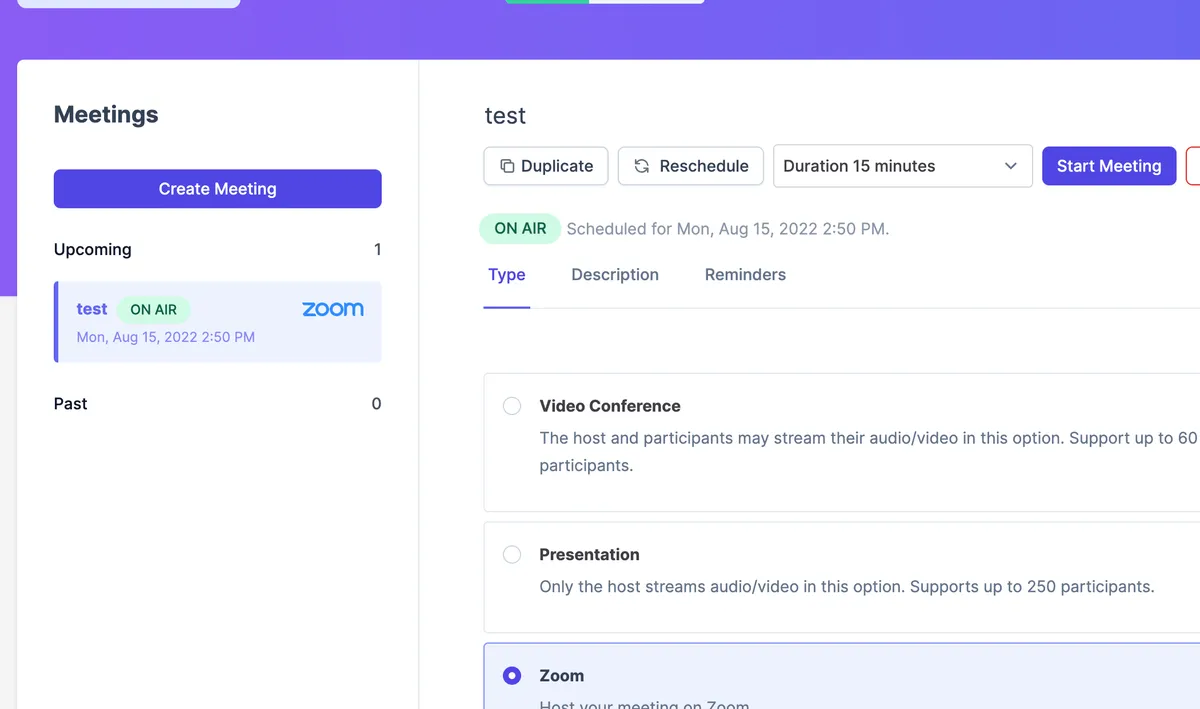
Multiple ways for students to join
Students can join from a button inside the course, from email reminders, or from their personal calendar — so everyone gets in, every time. No more "I couldn't find the link" messages.
Secure unique link for every call
Ruzuku generates a fresh, unique Zoom link for each session — no reusing the same meeting ID. Added security for you and your students.
Automatic time zone handling
Schedule sessions in your time zone — Ruzuku automatically displays the correct local time for each student. No more "What time is that for me?" questions.
Recordings and searchable transcripts
Cloud recordings sync to the course automatically. On the Pro tier, meetings get AI transcription too — fully searchable, so students can find exactly what they need.
Real-World Examples
Here's how course creators like you actually use this integration.
Weekly Q&A Sessions
Host "Coffee with Coach" sessions where students drop in to ask anything — great for building community.
Interactive Workshops
Run intensive sessions with breakout rooms for small group discussions and hands-on practice.
Cohort Check-ins
Keep cohort students accountable with regular group calls to share progress and get support.
Guest Expert Interviews
Bring in industry specialists for live interviews that your students can attend and ask questions.
Key Capabilities
Common Questions About Zoom
How do students join a Zoom session?
Students have multiple ways to join: a "Launch Meeting" button right inside the course (appears about 5 minutes before start), a direct link in the automatic email reminders, or from their personal calendar if they've added the session. Every session gets a unique, secure Zoom link — no reused meeting IDs. See our Zoom Integration guide for the full setup process.
Are Zoom recordings automatically saved to my course?
When you record to the cloud in Zoom, the recording uploads to the course meeting page automatically once processing is complete (this can take a while for longer sessions). Local recordings need to be uploaded manually. Only video recordings and chat transcripts are supported. See our Manage Course Meetings guide for more details.
What meeting types does Ruzuku support besides Zoom?
Ruzuku offers four meeting types: Zoom, Ruzuku Video Conference (with built-in slides, chat, screen sharing, and auto-recording), Presentation mode (instructor-only audio/video), and External (for any other meeting software where you provide the link). See our Manage Course Meetings guide for details on each type.
Does the Zoom integration cost extra?
No. The Zoom integration is included free on all Ruzuku plans. You just need your own Zoom account (free or paid) to connect.
Will my Zoom integration continue to work if I switch to the Free plan?
Yes. Your Zoom integration keeps working when you switch to the Free plan — you don't need to disconnect or reconnect anything. The Zoom integration is included on all Ruzuku plans (Free, Core, and Pro). You can continue scheduling meetings for your existing students and running live sessions. The only Free-plan limit is on new student enrollments (up to 5 at a time across your account) — existing students stay enrolled with full access.
Do students get reminders before a live session?
Yes. Ruzuku automatically sends email reminders 24 hours before, 1 hour before, and as each meeting starts — and each reminder includes a direct join link so students can hop straight into the call. You can customize or turn off each reminder message, and students can also add meetings to their own calendars. See our Manage Course Meetings guide for details on configuring reminders.
What happens if a student misses a live session?
If you recorded the session to the cloud in Zoom, the replay appears on the course meeting page automatically. On the Pro tier, meetings also get automatic AI transcription, so students can read or search the transcript instead of watching the full recording. They can still participate in any related discussions or activities.
Ready to Connect Zoom?
Go to your account Integrations page, connect your Zoom account, and you're ready to create Zoom meetings inside any course. No plugins to install.
No credit card required · 0% transaction fees · Cancel anytime